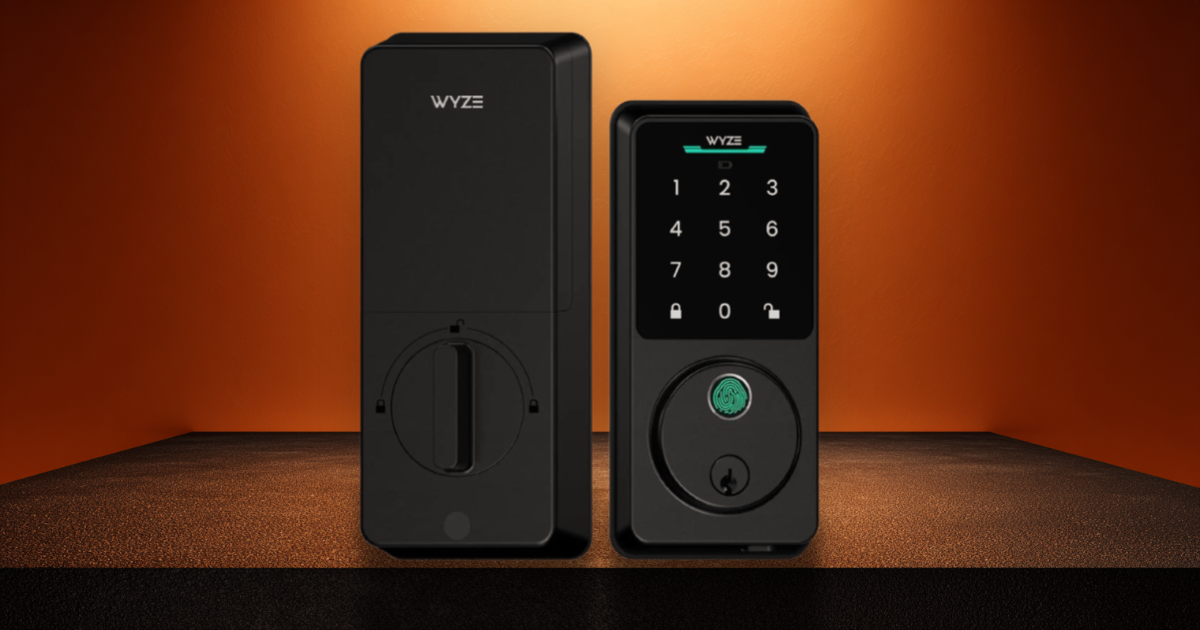
Wyze has built a brand on one premise: take the features people want from expensive smart home products, strip out the premium pricing, and sell them at a number that makes you check twice. Their cameras did it. Their video doorbells did it. And the Lock Bolt v2 does it to the smart lock market — delivering WiFi connectivity, a fingerprint scanner, a backlit keypad, a mechanical key backup, and app control for about $80. That's a third of what the Schlage Encode Plus costs, with a feature the Schlage doesn't even have (the fingerprint reader).
The question NoPryZone always asks is: what did they cut to hit that price? And the answer is the part we care about most — the physical security.
The Fingerprint: The Star of the Show
Let's start with what the Lock Bolt v2 does best, because it genuinely does it well. The fingerprint scanner is fast — Wyze claims 0.3 to 0.5 seconds, and in practice it's basically instant. Touch the sensor, the bolt retracts. No code to type, no phone to pull out, no key to find. It's the fastest unlock method available on any smart lock we've reviewed.
The v2 uses what Wyze calls an "AI self-learning scanner" — it logs the pressure, angle, and micro-variations of your fingerprint with every scan and dynamically refines its model over time. In practical terms, this means the scanner gets more reliable the more you use it. Cold fingers, slightly wet hands, seasonal skin changes — the algorithm adapts. It stores up to 50 fingerprints locally on the device (never in the cloud), and you can assign different access levels to different users through the app.
We found it worked reliably about 95% of the time in normal conditions. Cold or very wet fingers occasionally require a second tap. That's consistent with what other reviewers have reported and comparable to smartphone fingerprint readers.
The fingerprint scanner is the single best feature on any smart lock under $100. It's faster than typing a code, more convenient than an app, and it doesn't need WiFi to work. For $80, this alone almost justifies the purchase.
WiFi: The v2's Biggest Upgrade
The original Lock Bolt was Bluetooth-only, which meant you could only control it when standing next to it. The v2 adds 2.4GHz WiFi, and this changes everything. Remote lock and unlock from anywhere. Real-time notifications when someone enters. Activity history that syncs without needing to be in Bluetooth range. The ability to generate emergency access codes for guests even when you're not home.
The Wyze app handles all of this, and it's functional if not elegant. User management is straightforward — you can assign fingerprints, codes, and schedules per user. The auto-lock feature works as expected. Integration with Alexa and Google Assistant lets you voice-lock (though not voice-unlock, for security reasons). Wyze Video Doorbell owners get a bonus feature: lock and unlock directly from the doorbell's livestream.
AI self-learning fingerprint scanner (50 prints, local storage). Built-in WiFi — remote control from anywhere. Tempered glass keypad (anti-glare, scratch-resistant). 50 access codes with scheduling. Anti-peep code entry (add random digits). Physical key backup. Auto-lock with adjustable timer. Tamper and jam alarms. USB-C emergency power port. 8-month battery life (8x AA included). Wyze Doorbell integration. Alexa and Google Assistant compatible. IP53 weather resistance. BHMA Grade 2 certified.
The Security Reality Check
Here's where NoPryZone has to be NoPryZone. The Wyze Lock Bolt v2 is BHMA Grade 2. Not Grade 1. Grade 2 means fewer tested force cycles (400,000 vs. 800,000), lower impact resistance (5 strikes vs. 10 from a 75-lb force), and a less rigorous security testing regime overall. For most suburban homes, Grade 2 is perfectly adequate. But it's measurably less secure than the Schlage Encode Plus or Connect, both of which are Grade 1.
The IP53 weather rating is also the bare minimum for outdoor use. IP53 means protection against limited dust ingress and water spray from any direction. It'll handle a covered porch. It probably won't handle direct exposure to heavy rain, snow, or extreme temperature swings over years of use. Competitors like the Aqara U100 carry IP65, which is significantly more robust.
There's no Apple HomeKit or Home Key support, no Matter compatibility at launch (though Wyze has hinted at future support), and the interior escutcheon is noticeably bulkier than premium competitors. These aren't dealbreakers at $80, but they're the corners that got cut to hit that price.
BHMA Grade 2 — not Grade 1. No Apple HomeKit or Home Key. No Matter support at launch. IP53 weather rating is bare minimum. Interior assembly is bulky. No built-in forced-entry alarm (just tamper detection). Must use 1.5V alkaline batteries — no rechargeables. Fingerprint scanner needs occasional second tries in cold/wet conditions. Motor is audibly louder than premium locks. No key control on the physical backup key.
Who This Lock Is For
The Wyze Lock Bolt v2 is perfect for renters who want smart features without a big investment, first-time smart lock buyers who want to see if keyless living works for them, households that prioritize fingerprint access over ecosystem integration, anyone on a budget who wants the most features per dollar, and Wyze ecosystem users who already have Wyze cameras and doorbells.
It is not the right choice if physical security is your top priority (get the Schlage Encode Plus), if you're an Apple household that wants Home Key (Encode Plus), if your front door is directly exposed to harsh weather (look for IP65+), or if you need your lock integrated into a Z-Wave security system (get the Schlage Connect BE469).
The Spec Sheet
| Category | Wyze Lock Bolt v2 |
|---|---|
| BHMA Grade | Grade 2 |
| Connectivity | WiFi (2.4GHz) + Bluetooth |
| Fingerprint | AI self-learning, 50 prints, 0.3–0.5s |
| Access Codes | 50 (with scheduling) |
| Unlock Methods | Fingerprint, keypad, app, physical key, Wyze Doorbell |
| Smart Home | Alexa, Google Assistant, Wyze Automations |
| Apple HomeKit | No |
| Anti-Peep | Yes |
| Auto-Lock | Yes, adjustable |
| Battery | 8x AA, ~8 months |
| Emergency Power | USB-C port |
| IP Rating | IP53 |
| Faceplate | Tempered glass, anti-glare |
| Price | ~$70–$80 |
| NoPryZone Score | 6.5 / 10 |
The Best Smart Lock You Can Buy for the Price — And the Price Is the Point
The Wyze Lock Bolt v2 is not the most secure smart lock. It's not the best-built, the best-integrated, or the most weather-resistant. It's the most feature-rich lock under $100 by a significant margin, and for a lot of people, that's exactly what matters.
The fingerprint scanner is legitimately excellent. WiFi remote access works as advertised. The tempered glass faceplate looks and feels better than it has any right to at this price. And the mechanical key backup means you're never actually locked out, which is more than some pricier smart locks can claim.
If you live in a low-risk area and want the convenience of fingerprint entry without spending $300, the Lock Bolt v2 delivers. Just understand what you're trading: Grade 1 for Grade 2, HomeKit for no HomeKit, IP65 for IP53. Those trade-offs are the cost of the price tag. For $80, we think most people will take that deal happily.